Ever wondered does system memory affect gaming performance in your favorite titles? If you are a busy gamer juggling work, family, and a precious few hours for digital adventures, understanding your RAM is crucial. This comprehensive guide dives deep into how system memory, or RAM, directly impacts your gaming experience, from lightning-fast loading screens to smooth, lag-free gameplay and seamless multitasking. We explore ideal RAM capacities for modern games, the importance of RAM speed, and practical tips for optimizing your setup without breaking the bank. Discover how a smart memory upgrade can transform your PC, providing that much-needed performance boost for a truly immersive and stress-free gaming session. Learn what to look for when upgrading and how to make informed decisions that align with your budget and gaming habits, ensuring your system keeps up with the latest releases and your social gaming sessions remain uninterrupted. This is your ultimate resource to demystify RAM and unlock your PC's full gaming potential, helping you play smarter, not harder.
What are the immediate signs that insufficient RAM is affecting my gaming?
The most immediate and frustrating signs of insufficient RAM while gaming include severe stuttering or freezing during gameplay, unusually long loading screens when launching a game or moving between areas, and your entire system feeling sluggish or unresponsive, especially when you have other applications open in the background like Discord or a web browser. If you frequently see 'out of memory' errors, that's a direct indicator.
How much RAM is truly necessary for modern AAA games in 2026 without overspending?
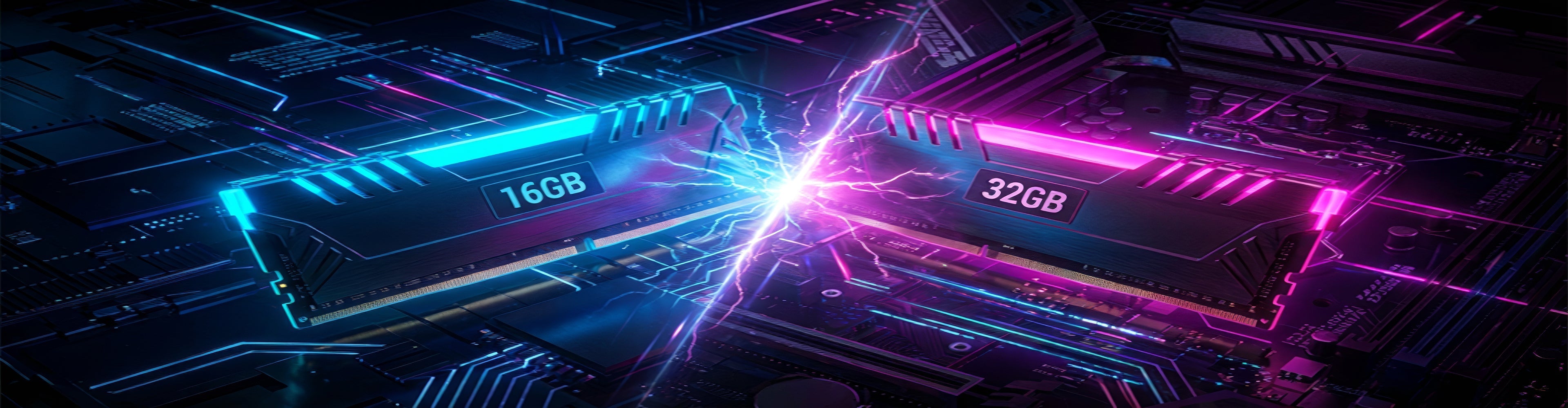
For most modern AAA games in 2026, 16GB of RAM remains the sweet spot for a smooth, lag-free experience at 1080p and 1440p resolutions. While 32GB offers a slight edge in some very demanding titles and provides excellent future-proofing and multitasking capabilities, 16GB is often sufficient to avoid performance bottlenecks caused by memory, especially for gamers on a budget who want great value without hype.
Does RAM speed (MHz) make a bigger difference than RAM capacity (GB) for gaming?
Both RAM speed (MHz) and capacity (GB) are crucial, but their importance depends on your current setup. If you have less than 16GB of RAM, capacity is almost always the priority. However, if you already have 16GB, then increasing RAM speed (e.g., from 2400MHz to 3600MHz) will typically offer a more noticeable performance boost, especially in minimum frame rates and CPU-intensive games, optimizing your gaming without overhauling your entire rig.
What is the best way to install new RAM for optimal gaming performance?
To install new RAM for optimal gaming performance, always purchase a matched kit (two or four sticks) for dual-channel (or quad-channel) operation. Refer to your motherboard's manual to identify the correct slots for dual-channel configuration (often slots 2 and 4, or 1 and 3). Ensure your motherboard's BIOS/UEFI is updated, and after installation, enable the XMP (Extreme Memory Profile) or DOCP setting in the BIOS to ensure your RAM runs at its advertised speed, not a slower default.
Are there any common RAM myths or misconceptions gamers should be aware of?
Yes, a common myth is that more RAM is always better. While having enough is vital, going beyond 32GB for gaming alone typically offers diminishing returns and is an unnecessary expense for most. Another misconception is that single-stick RAM performs just as well as two sticks; single-channel RAM significantly bottlenecks performance. Also, simply installing faster RAM doesn't guarantee it will run at that speed; you must enable XMP in the BIOS.
Can insufficient RAM cause crashes or system instability during gaming sessions?
Absolutely. Insufficient RAM can lead to frequent game crashes, blue screens of death (BSODs), or general system instability, especially during intense gaming sessions or when trying to run multiple applications alongside your game. When your system runs out of physical RAM, it relies heavily on much slower virtual memory on your storage drive, which can lead to data corruption, unresponsiveness, and outright crashes, ruining your relaxation time.
How can I balance RAM upgrades with other components on a limited gaming budget?
On a limited budget, prioritize a balanced system. If your current RAM is 8GB or less, upgrading to 16GB of decent speed (3200-3600MHz) should be a top priority after ensuring you have a capable CPU and GPU. If you already have 16GB, consider if your money is better spent on a faster SSD or a GPU upgrade for a bigger impact on frame rates. Always check compatibility between components and look for value-for-money deals, especially during sales, for that performance boost without the hype.
Hey fellow gamers! If you're anything like me, you're probably balancing a job, family life, and trying to squeeze in some quality gaming time. You want your precious gaming moments to be smooth, immersive, and free from frustrating slowdowns. Nothing ruins a hard-earned victory or a cozy co-op session faster than choppy frame rates or endless loading screens. That's why one question often pops up for us busy adults: does system memory affect gaming? You bet it does, and understanding its role is key to optimizing your setup without unnecessary spending. This guide is designed to help you navigate the world of RAM and gaming, ensuring your system performs at its best so you can focus on the fun.
We've all seen those tempting advertisements for the latest graphics cards or CPUs, but often overlook the quiet hero inside our PCs: System Memory, or RAM. While it might not grab headlines like a new GPU, RAM is absolutely critical to your gaming experience. It's where your system temporarily stores all the data your CPU and GPU need to access quickly – everything from game textures and character models to background applications like Discord or your web browser. Without enough fast RAM, even the most powerful processor or graphics card can be held back, leading to stuttering, long load times, and a generally less enjoyable experience. With 87% of US gamers regularly diving into virtual worlds, often spending 10+ hours a week, and social gaming trends continuing to dominate, ensuring your system is optimized for performance and multitasking is more important than ever. Let's dive into how RAM truly impacts your digital adventures.
What Exactly Is System Memory (RAM) and Why Is It Important for Gaming?
System Memory, or Random Access Memory (RAM), is your computer's short-term memory. Unlike your hard drive or SSD, which stores data long-term, RAM holds data that your CPU and GPU need to access immediately. When you launch a game, its core files, textures, and other assets are loaded into RAM. This allows your processor to pull information almost instantly, enabling smooth gameplay. Think of it like your desk: the larger and more organized your desk (RAM), the more books and notes (game data) you can have open and readily accessible without constantly running to the bookshelf (storage drive).
How Does RAM Capacity (GB) Directly Affect Gaming Performance?
RAM capacity is arguably the most straightforward factor. If you don't have enough RAM, your system will start relying on your storage drive (SSD or HDD) to store temporary data, a process known as 'paging' or using a 'page file.' This is significantly slower than RAM, leading to noticeable stuttering, longer loading screens, and reduced frame rates. For today's games, especially those demanding AAA titles or competitive esports where every millisecond counts, adequate RAM is non-negotiable. Many modern titles like Call of Duty Warzone, Cyberpunk 2077, or Starfield are increasingly RAM-hungry.
- 8GB RAM: Bare minimum for very light gaming or older titles. Expect significant stuttering and performance issues in most modern games. Not recommended for new builds.
- 16GB RAM: The sweet spot for most gamers in 2026. This capacity allows you to run nearly all current AAA games smoothly at 1080p or 1440p, even with background apps like Discord or Twitch open.
- 32GB RAM: Ideal for enthusiasts, content creators, or those who frequently multitask while gaming (streaming, video editing, heavy browser usage). It future-proofs your system and offers a noticeable improvement in demanding simulations, open-world games, and ensures stability for VR experiences or running multiple game clients simultaneously.
- 64GB RAM+: Overkill for gaming alone. This is typically reserved for professional workstations, heavy video editing, or 3D rendering.
Does RAM Speed (MHz) and Latency (CL) Really Matter for Frame Rates?
Yes, absolutely! While capacity gets most of the attention, RAM speed (measured in MHz) and latency (measured in CL or CAS Latency) are crucial. Faster RAM means your CPU can access data quicker, directly translating to higher and more stable frame rates, especially in CPU-intensive games or scenarios. For example, upgrading from 2400MHz to 3600MHz RAM can provide a significant uplift, sometimes 10-20% in minimum frame rates, which is vital for preventing stutters in fast-paced action. Lower latency (e.g., CL16 vs CL18 at the same speed) is also better, as it means less delay in accessing data. For AMD Ryzen CPUs, faster RAM often yields even greater performance gains due to how the Infinity Fabric architecture interacts with memory.
What is Dual-Channel RAM and Why Is It Essential for Optimal Gaming?
This is a critical, yet often overlooked, optimization. Running RAM in dual-channel mode means installing two (or four) sticks of RAM into corresponding slots on your motherboard, allowing the CPU to access data from both sticks simultaneously. This effectively doubles the memory bandwidth, leading to substantial performance improvements. If you're currently running a single 16GB stick, adding a second identical 16GB stick will often provide a much bigger boost than simply having 16GB. Always aim for at least two sticks of RAM for any gaming PC.
Can Upgrading RAM Improve My Gaming Experience on an Older PC?
For many gamers balancing budgets and trying to get more life out of their existing machines, a RAM upgrade can be one of the most cost-effective performance boosts. If your older PC is currently running 8GB of slow RAM, upgrading to 16GB of faster RAM (if your motherboard supports it) can dramatically improve loading times, reduce stutters, and make games feel much smoother. Before buying, check your motherboard's specifications for supported RAM types (DDR4, DDR5), maximum capacity, and speed. It's a great way to squeeze extra performance without a full system overhaul, allowing you to enjoy popular titles and social gaming with friends more reliably.
How to Check Your Current RAM Configuration and Usage?
Before you even think about upgrading, it's smart to know what you're currently working with and how your games are using it. On Windows, you can:
- Right-click on your Taskbar and select
System memory (RAM) is vital for gaming performance affecting frame rates, loading times, and multitasking. Modern games demand more RAM, typically 16GB or 32GB, with higher speeds (e.g., 3200MHz, 3600MHz) significantly improving frame stability. Dual-channel configuration is crucial for optimal performance. Upgrading RAM can be a cost-effective way to boost older systems, especially for gamers balancing life commitments and seeking value. Understanding RAM specifications and usage patterns helps optimize your gaming setup for current and future titles.
35#1 Gallery does system memory affect gaming



How Does RAM Latency Affect Gaming Performance YouTube . How Much RAM For Gaming In 2026 8GB Vs 16GB Vs 32GB The Ultimate Guide How Much Ram For Gaming 768x429 . How Much RAM Do You Need For Gaming In 2026 AdobeStock 423480988 1 915x610 . When Will DDR5 Prices Drop 2026 Memory Market Forecast Unibetter Ddr5 Price 2026 600x403 . RAM Price Crisis 2025 2026 Analysis And Forecast RAM Crisis RAMageddon Memory Prices 2025 DDR4 DDR5 Expensive Memory Shortage 2026 Forecast AI And Memory
#2 Gallery does system memory affect gaming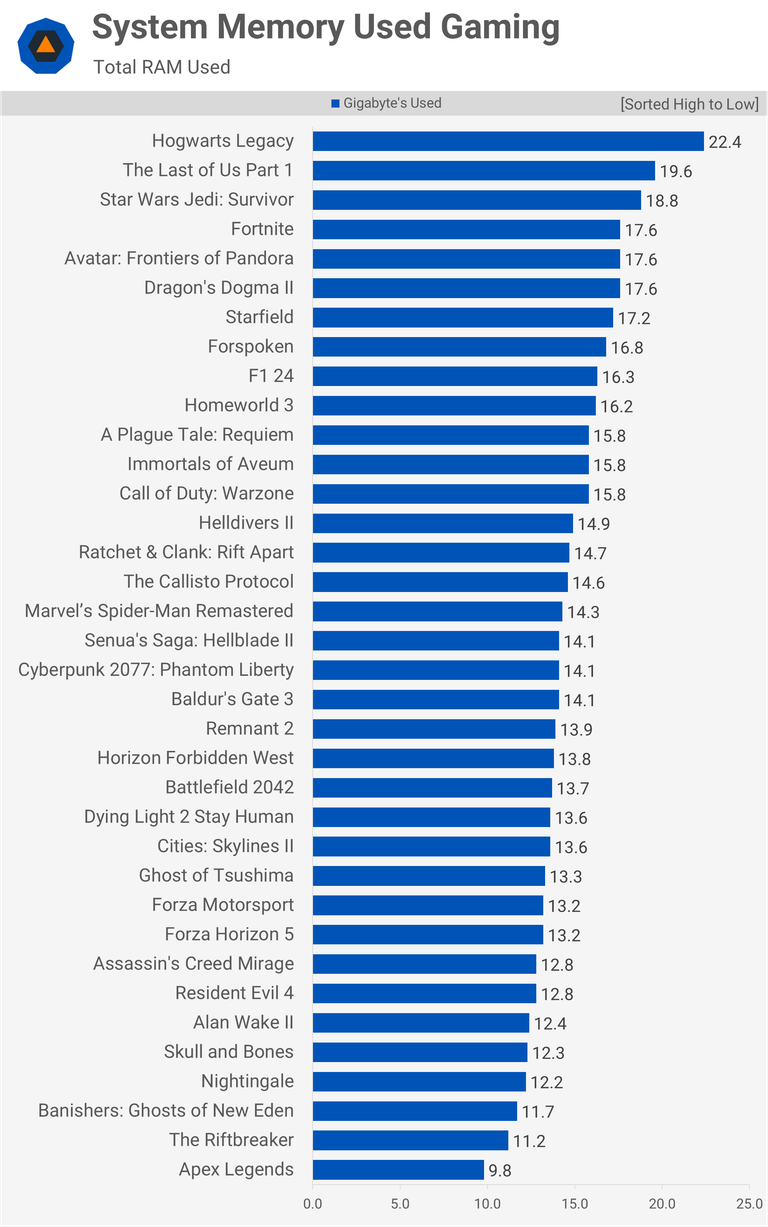


Why Memory Prices Are Rising In 2026 And Why It Affects Every Device. How Much RAM For A Gaming PC In 2024 16 Vs 32 Vs 64 GB Tested In 30 Games 1720102545 2201 Photo . How Much RAM Do You Actually Need For Gaming In 2026 Reforged Rigs 16GBvs32GB . How Much RAM Is Needed For Gaming In 2026 Full Benchmark Analysis Ddr5 Memory Price Increase Pc Demand.webp. 2026 Gaming Hardware Crisis How Rising RAM And Storage Costs Will Ddr
#3 Gallery does system memory affect gaming


Micron Roadmap Lists 24Gb 36Gbps GDDR7 Memory Arriving In Late 2026 And Micron Roadmap Lists 24gb 36gbps Gddr7 Memory Arriving In V0 . Is 16GB Of RAM Still Enough For Gaming In 2026 Here S What The Data S 16GB Of RAM Still Enough For Gaming In 2026 Heres What The Data Really Says.webp. RAM Reality Check How Much Memory Does Your PC Actually Need In 2026 2 . SSD Vs HDD For Gaming Does Your Storage Affect FPS Switchblade Gaming Ssd Vs Hdd Gaming.webp. Best Gaming Laptop With Thunderbolt 4 For 2025 Does Cpu Affect Laptop Speed.webp
#4 Gallery does system memory affect gaming


Memory Shortage 2025 2026 Causes Impact And How To Build A PC Memory Shortage 20251212 1 . The 2026 Global Memory Price Surge The 2026 Global Memory Cost Surge Banner . How Gaming Affects The Brain Boost Focus Memory How Gaming Affects The Brain . We Tracked Ram Prices In 2025 This Is What We Found And What You Screenshot 2026 01 11 At 2.27.30 AM 1024x680 . Does Your Computer Need More Memory For This Computer 2026 Memory Outlook Report Cover
#5 Gallery does system memory affect gaming

.jpg)
Memory Market Chaos Is Impacting PS6 Xbox Switch 2 And PC Hardware Ddr5 Ram . How Much Memory Do You Need For Gaming 2026 EYtSQkd7dQk Lg . PC Gaming 2026 The End Of An Era And The Advent Of Next Gen Ventilateur Carte Graphique 700x420 . RAM Reality Check How Much Memory Does Your PC Actually Need In 2026 Razer Blade 14 2025 G34w . 2026 Gaming Hardware Crisis How Rising RAM And Storage Costs Will Rog Xbox Ally (2)
#6 Gallery does system memory affect gaming
Memory Matters For Gaming In 2025 CORSAIR MM Graph 2024 16v32GB 1000.format Webp.webp. Future Of Gaming Memory Unveiled ISSCC 2026 Features SK Hynix GDDR7 Future Of Gaming Memory Unveiled Isscc 2026 Features Sk Hynix Gddr7 Lpddr6 And Samsung Hbm4.webp. How To Optimize A Best Gaming PC 2026 Guide Sirius Power PC Gaming PC Performance 4 Min . Memory Price Surge Squeezes Game Console Margins 2026 Shipment 20251203 090522 1202 Sr Game Console Pk En . Gaming RAM In 2026 XMP 3 0 AMD EXPO And How To Choose 5.3 1024x572
#7 Gallery does system memory affect gaming



Best RAM For Gaming In 2026 I Ve Tested The Best DDR4 And DDR5 RAM To . Best Gaming PC For Under 500 In 2026 Exp Gaming PC Guru Best Gaming Computer Memory Featured 800x500 . The Best RAM For Gaming 2026 The Best Memory To Buy In This Trying 1200 80 . Best RAM For Gaming In 2026 9meters 1pjstsxr3ks . MSI Brasil Escassez De Mem Ria Em 2025 2026 Causas Impactos E Memory Shortage 20251212 3